Scenario-based Learning in Emergency Services – Success, how to, and the need for more!

Throughout all professions and specialties within the broad category of public safety and emergency services, we go through a lot of training.  Training within these various professions has become a profession itself, with many individuals, myself included, spending much of their career as trainers.  Through the vast quantity and variety of training we’ve received, we see many examples of training across the whole spectrum of quality and effectiveness and have endeavored to improve upon training and increase learner retention.

My Experiences

Much of the training that is most memorable to members of the public safety community is that which is hands-on.  Three classes in particular that stand out to me are the New York State Mask Confidence course, the DHS-sponsored Incident Response to Terrorist Bombings (IRTB) course conducted at the New Mexico Energetic Materials Research and Training Center (EMRTC), and the DHS-sponsored Enhanced Incident Management/Unified Command course conducted at the Texas A&M Engineering Extension Service (TEEX).

I attended the Mask Confidence Course about 15 years ago when I was active in the fire service.  Course instruction was led by Chuck, a well-respected fire officer in Central New York and an outstanding fire instructor (who, a number of years later, worked for me as an adjunct).  The premise of the course is for participants to become confident in their own abilities and limitations while wearing self contained breathing apparatus (SCBA).  Much of the course was conducted under blackout conditions, either in a darkened room or wearing a blackout mask, so you had to learn everything by touch – while wearing bulky firefighting gloves.  The course started simply, with a timed donning of all gear and SCBA in a darkened gymnasium; and ended with much more complexity several sessions later by navigating a dark, smoke-filled maze on your hands and knees, sometimes having to remove (then re-don) the SCBA pack to fit through tight spaces, all while still ensuring that you can breathe through the mask.  The course certainly increased my confidence in wearing SCBA and gave me important lessons learned which I was able to apply in fire operations later.

The IRTB course was an excellent program which instructed participants on the chemistry and physics of explosives – including those in common industrial and military use, as well as improvised devices – first in a classroom environment then in a field lab where we had the opportunity to see these explosives in action first hand.  The class was fun and insightful, but rigorous and more cerebral than expected.  As with many DHS consortium programs, the EMRTC has its own course managers and draws on expertise from around the nation to aid in instruction.

The Enhanced Incident Command/Unified Command course included a review of ICS concepts – mostly those at the ‘intermediate’ level, with emphasis on the management of a Type III (extended) incident and the necessity of transitioning to the formal planning process within ICS.  Learning was reinforced through participants taking on roles in an ICS structure and being challenged by a computer-based simulation.  Similar to the EMRTC course, this program drew upon the expertise of instructors from around the country.

Why Scenario-based Learning Works

Why do these three courses stand out for me?  Certainly they are topics of interest and had great instruction.  That alone should help anyone remember some of the course content, but these shine well above others.  Because they were hands-on?  Certainly Mask Confidence was hands-on, but to maintain safety, IRTB was mostly hands-off – literally.  They didn’t actually let us touch any of the explosives.  The TEEX course gave us a computer-based simulation, which is only somewhat hands-on.  So what was it that made these programs stick with me?  The commonality of these programs is that they were scenario-based.

In each course we first learned foundational material through traditional didactic instruction.  Certainly, the use of examples, pictures, and video enhanced our learning.  After the didactic portions, we were then challenged with a series of scenarios, each different from the previous and with increasing complexity.  Mask Confidence was largely an individual course – intended to build your own skills and confidence with your own life-sustaining equipment in adverse conditions.  While IRTB provided a group learning environment, we didn’t necessarily work together to solve problems; rather we were posed with scenarios to examine, akin to an amateur forensic level, to evaluate cause and effect.  The Enhanced Incident Command/Unified Command course was very much based upon individuals contributing to group success in solving problems.

Why is scenario-based learning so successful?  First, consider the graphic below.  We’ve all seen variations of this information.  The bottom line is that the increased degree to which a learner is actively engaged, the more information they will retain.  Many of the activities I described above for the three classes that stand out in my memory are contained in the 50%+ categories of retention.

Learner retention based upon delivery method

Learner retention based upon delivery method

How do we apply this concept to learning?  Bloom’s Revised Taxonomy is a regular reference I use when designing courses and can be a great starting point to determining if participants can benefit from scenario-based learning.  The essential meaning behind Bloom’s Taxonomy is: What level do participants need to be trained to?  In emergency services we often use the term ‘Awareness’ level training to identify a course at the lower levels of Bloom’s Taxonomy – those are the levels where we need to remember or understand information, but aren’t required to use the information.  In an ‘Operations’ level training course, learners are expected to apply what they have learned and perhaps do a lower level of analysis.  In a ‘Technician’ level course, higher levels of analysis as well as evaluation and creation are often expected as learner outcomes.  Compare the terms from the Bloom’s Taxonomy graphic below to those on the right side of the learner retention graphic above and you will see some similarity.  The correlation is that if we expect learners to apply, analyze, evaluate, or create, we need to ensure a higher rate of retention – therefore scenario-based learning is often an ideal strategy.
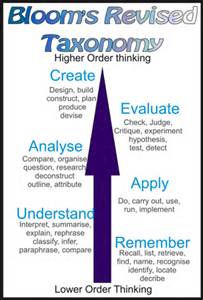
Bloom's Revised Taxonomy

Bloom’s Revised Taxonomy

How to Integrate Scenario-based Learning

Integrating activities into training courses can be tricky.  There are a great number of ‘training games’ out there – (Amazon has a huge listing of books on the subject), but every activity in a course has to be meaningful and drive toward one or more course objectives.  We’ve all seen gratuitous activities integrated into courses.  While some of these may be great, they do nothing to help us achieve the course objectives.  Also, simply having activities does not make a course scenario-based.  To achieve this, you need to include one or more scenarios.  Make sense?

The Bing dictionary defines ‘scenario’ as:

Definition of scenario (n)

  • sce·nar·i·o
  • [ sə nárree ō ]
  1. possible situation: an imagined sequence of possible events, or an imagined set of circumstances
  2. plot outline: an outline of the plot of a play or opera
  3. screenplay: a screenplay for a movie

We develop scenarios for exercises all the time, so when trying to integrate a scenario into a training course, just consider it a miniature version of an exercise.

First – where to start?  As mentioned earlier, a scenario must be associated with one or more learning (course) objectives.  It also must have (enabling) objectives of it’s own.  In other words, what are the expected outcomes of participating in the scenario for the learner?  Perhaps you want your learners to create an Incident Action Plan (course objective).  Scenario-based learning is great for this.  First, I would use didactic instruction to review the planning process and the tools (ICS forms) associated with this.  Then you can assign roles (within an ICS structure) and provide a scenario to help facilitate learning.  The scenario should generally be realistic, although you can always put a fun twist on it by using a zombie attack or some such thing.  This however, can be distracting – so you are better off sticking with something realistic and familiar to the learners.  HazMat incidents tend to work well as scenarios across the nation.  Add context by including detail – fixed facility or in transit (road?  rail?).  Time of day, day of the week, weather.  What were the immediate impacts?  What are the current threats?  The same concepts can be applied for something more hands-on, such as for water rescue training or a hostage negotiation training.

You have a choice of either placing the scenario in a location in which the learners are familiar (they know the roads, the resources, etc.), or providing a fictional location with supplemental information which they have to learn (maps, resource lists, etc.).  Both work with a fair amount of success, but you can be challenged if not all participants are familiar with the same area.  The HSEEP training course provides fictional jurisdictions I’ve used often for different training courses, as does FEMA and the EPA.  You can create a fictional jurisdiction yourself, but to do it right takes time and attention to detail.  Consider using a progressive scenario to facilitate several activities through the training program.

Be sure to give your participants clear instructions on what is expected of them.  Challenge them, but don’t frustrate them, which can impede learning.  Remember, this is NOT a formal HSEEP exercise as we know them.  Learners are not being tested, nor are policies, plans, or procedures.  You are providing a structured, experience-based learning environment.  Be sure they have the tools to succeed. With the Incident Action Planning scenario, an ICS Field Operations Guide (FOG) or text book guidance is a great reference for them.  Provide learners with the opportunity and a safe environment to ask questions, and even correct them if they stray too far from the desired path.  Remember – perfect practice makes perfect, so learners should be practicing ‘by the book’.

Finally, similar to exercises, hot wash the activity.  Ask learners how they feel the activity went.  What went well, what didn’t go so well?  What feedback do the instructors have?  While we aren’t testing learners in these scenarios, we should be evaluating them.  This open discussion feedback is important to their learning and can also help you improve your scenario for the next time.  The folks in TEEX actually capture video and audio of participants during activities which they use to help facilitate hot wash sessions.  This obviously takes time, equipment, and personnel which most don’t have available to them – but it’s great to experience.

Scenario-based learning takes a lot of preparation and forethought.  It also takes a lot of training time to implement.  When we’re fighting for training time and training dollars, we need to advocate for the value of scenario-based learning.  Make sure it’s done right, though… a poorly executed activity can have a negative impact on learning.

Scenario-based learning works.  There are best practices in the training of firefighters, police officers, EMTs, and dispatchers using scenarios.  They help learners ‘get their head into the task’, helping them bridge the mental gap between an activity and real-world application.  Consider how not only to integrate scenario-based training into your courses to reinforce learning, but also to substitute content we are currently delivering by other, less interactive means.

What successes have you found in scenario-based training?  What challenges have you encountered?  I’d like to hear from you.


Tim Riecker
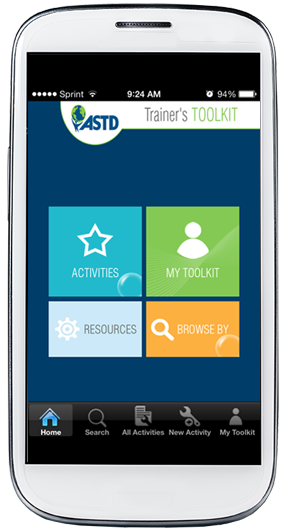
App Review – The ASTD Trainer’s Toolkit

ASTD app home screen

ASTD app home screen

A few weeks ago I downloaded the new ASTD (the American Society for Training and Development – recently changed to the Association for Talent Development) iOS app, the ASTD Trainer’s Toolkit.  Surprisingly, as the ASTD doesn’t give much away, this app is FREE!  The ASTD info site for the app can be found here.  As their website states, the app includes 20 original classroom and virtual training activities to energize, motivate, and help learners to retain content.  The activities include closings, energizers, forming groups, and topical openings.  All of this content is internal to the app.  The app also includes links to external content such as articles on Training and Development (T&D) and a selection of T&D books through links to external content (the ASTD website for articles, and the iTunes Library – for iOS users – for the books).  There is an article native to the app titled ‘Intro to Facilitation’ and an ability to create your own notes, add your own activities (they provide you with a template), and add their activities to your own list of favorites.  While the app can function as a stand-alone on your device, you can also log in through Facebook or Google to access your data from anywhere.

This can be a handy app when you are stuck trying to think of a learning activity for a group.  They break each activity down with a variety of essential pieces of information, including the size of the group the activity is applicable for, the time of the activity, the person who contributed the activity, the goal of the activity, the materials and/or technology needed for the activity, search tags related to the activity, and a step by step process for conducting the activity.  They also provide some facilitator notes/tips for each activity.  The user can enter their own notes for each activity or use an in-app timer.  You can also tap the ‘favorite’ star in the upper right corner to add the activity to your list of favorites.  You can also use the in-app search function to find activities based on various metrics such as group size or time limit.

In typical ASTD fashion, however, there are plenty of opportunities for in-app purchases.  Not only the books, but you can also download additional activities from the app.  These additional activities include Icebreakers, Openings, Reviews and Teachbacks, Trainer Tools and Techniques – each for $1.99, or all of them for $5.99.  There does not appear to be a limit on the number of article views from the app – if you are familiar with ASTD’s website, non-members have a great deal of restrictions on viewing their articles.

All in all, it’s a good app with solid, easy to reference information.  The app did crash on me since my first download of it, resulting in a need to delete the app and reinstall it.  I’d also like to see more information provided in the app.  Activities are great – and we should all include more objective-driven activities into our training – but what about other areas of training?  Perhaps the steps of instructional design – be it the ADDIE or SAM process?  Perhaps a reference for Bloom’s Taxonomy or the Kirkpatrick levels of evaluation – two things I often reference when designing instruction or when writing a proposal involving instructional design (especially the action words associated with each level of Bloom’s Taxonomy!).  Remember that training is more than just what occurs in a classroom.  I appreciate the ASTD/ATD for providing us with this app, but challenge them to give us more (and for free, thank you very much!).

Give the app a try yourself and let me know what you think.

TR

Book Review – The Manager’s Guide to Presentations

I was recently asked by Impackt Publishing to review one of their newest publications, The Manager’s Guide to Presentations (2014. ISBN-13 978-1783000142. http://www.amazon.com/The-Managers-Guide-Presentations-Lauren/dp/1783000147/ref=sr_1_1?ie=UTF8&qid=1394631990&sr=8-1&keywords=the+managers+guide+to+presentations).  The book was authored by Lauren M. Hug, an attorney who has likely both seen and conducted a number of presentations.  The books is available in both paperback (which I reviewed) and e-book.  Providing full disclosure, I was not compensated for the review, but was provided with a review copy. 

Initially I was a bit skeptical, as the paperback version is only 44 pages.  Tomes of 100s of pages have been published on the topic.  What information worth publishing can be found in only 44 pages?  Surprisingly, quite a bit! 

The target audience for the book is new managers, who often, as I can personally attest, often have little to no experience developing or delivering presentations.  Yet, given their position, are often called upon to give a variety of presentations.  The book is concise, which is perfect for managers with little available time, providing step by step guidance and several job aids to help them identify needs, outline presentation content, and deliver their presentation. 

If you’ve read any of my blog posts in the past on presentations or training, you know I’m big on ensuring an audience focus – they are, after all, the reason why we are doing the presentation in the first place.  Given that, I was initially dismayed that there was little mention of the audience in the early pages of the book.  However, as I progressed through the book, I realized the sense of the author’s approach.  Instead of focusing first on the audience, the author, keeping in mind that HER target audience was new managers, asks these new managers to put the focus on themselves first.  It’s a great reality check for new managers.  The author emphasizes the need for new managers to examine their own preferences, presentation tendencies, fears, and their particular goal for the presentation.  Some of these reflections are longer-term issues which likely don’t need to be examined for each and every presentation, but certainly the question of the new manager’s goal for the presentation is one that should be asked for each presentation given. 

Once the internal reflection is complete, the author directs the new manager toward the needs of the audience.  While she doesn’t spend as much time on audience analysis as I would like, she still hits the highlights.  She also provides a few items of consideration toward the logistical needs and environment of the presentation, with heavy emphasis on knowing the environment you are stepping into and being prepared for it. 

The second chapter focuses on designing the presentation.  I was pleased here to see considerable reference to the audience, their needs, and what the presenter needed them to walk away with.  Job aids prompting the reader to identify the audience appeal, presentation points, and a call to action help focus the neophyte presenter – brief but good points that Nancy Duarte would be proud of.  They finish off the chapter with several points on audience interaction.  I was quite pleased to see this, particularly since many presenters (both new and experienced) have a tendency to simply present rather than engage the audience. 

The third and final chapter focuses on body language and practicing the presentation.  A number of great ideas are given in this chapter, including pre-presentation discussions with stakeholders, when and how to rehearse, and conducting Q&A sessions. 

Overall, the book is quite effective.  It’s short and to the point, which is ideal for managers who have their attention pulled in many directions.  I would feel confident in handing this book off to a new manager and, if they followed the guidance contained therein, they would be successful in their presentation endeavor.  It’s not going to turn anyone into a presentation expert, but that’s not the goal of the book.  It provides great ideas and insight and the job aids are excellent.  Kudos to the author and publisher for identifying a need and providing good, concise information to address it. 

Must-Read Speaking Tips

From Forbes Magazine – originally written for entrepreneurs, but in general these are great tips for presenters and trainers!


For most of us, public speaking can be incredibly nerve-wracking. What if you mess up? What if no one claps? What if someone asks you a question you don’t know the answer to? What if you throw up on stage? (Seriously, you should at least stop worrying about that one.)

But with the right preparation, public speaking doesn’t have to be such a daunting, fretful experience. The chance to strut your stuff and raise awareness for your brand is actually really exciting, especially if you’re a young company looking to introduce your expertise—and offering—to the world.

Here, we outline five steps to take before you get up on that stage to make sure you most genuinely connect with your audience, get your point across in the time allotted, and (most importantly) don’t pass out.


1. Practice, Practice, Practice

The benefits of this old adage are twofold. First, becoming comfortable with the material you’ll be delivering will ease your nerves—after reading your speech to your mom, grandma, and six closest friends, the experience will feel much less intimidating.

Second, you’ll significantly improve your delivery. Audiences want to connect with the people they’re watching speak or present, and if you’re reading from a piece of paper for 20 minutes, they’re not going to have the opportunity to do so. The more you know your stuff, the more you’ll be able to make eye contact, throw in a joke, and ensure you pack in all of your crucial points before the buzzer.


2. Know Your Space

If you have the opportunity to do so—like at a conference or cocktail party—check out where you’re going to be speaking. Are you using a microphone? Do you have any AV requirements? The better you understand your surroundings, the more you can concentrate on the public speaking itself. And if you’re incorporating AV aspects into your presentation, back to #1 you go.


3. Know Your Audience

I’ve talked at great length about the importance of knowing your audience across all of the various ways you communicate. But this sentiment is arguably most important when it comes to communicating in person. Your number one goal for any public speaking opportunity is to really connect with your audience. Regardless of how well you address the topic at hand, if people don’t get it, it won’t resonate. And if you’re not getting your message across, what’s the point?

Research the event and check-in with the coordinators beforehand so you know who to expect, and then tailor your comments accordingly. For example, think about explaining the current social media landscape to a room full of senior citizens versus a room full college students. Different speech, right? (Answer: Yes.)

Another aspect to consider, thanks to our ever-evolving digital world, is any virtual audience that might be participating in the event. Is your presentation being live streamed? Live tweeted? It’s just as important to understand this community. Ask what platforms will be pushing out the content—like the event’s Facebook page—so you can further amend your speech to address this audience. And, as the technology behind this can get complicated (especially if you’re planning to engage with your digital audience in real-time!), apply tips #1 and #2 solely to this aspect prior to getting on that stage.


4. Find the Balance

If you’ve founded a content producing business, and you’re speaking at a Content Producing 101 workshop, it makes a lot of sense for you to talk about your company and your experience in the industry. But many times, the connection between what you do and what you’re speaking about isn’t so straightforward. And in these cases, remember that while you want to use the speaking opportunity to draw attention to your business, you also don’t want to come across as too salesy.

So how do you find the balance? Well, remember that you represent your brand, so if you give a kick-ass speech, people are going to want to know more about you. As long as there’s an easy place for them to find you and to learn about what you do (a.k.a., make sure your company’s name, website, and Twitter handle is in your slides or the event’s program), the connection will be made naturally—no awkward, forced interjections of your brand into your speech required.

That said, it’s also OK to find one or two places to seamlessly (and genuinely) tie together what you do and the topic you’re discussing as you’re crafting your remarks.

Finally, make sure to network at the event. One of the biggest benefits of public speaking is the opportunity to position yourself as an expert, so make yourself available for questions and meet-and-greets both before and after your speech so you can strut your stuff.


5. Breathe

Really, don’t forget to breathe. You’ll be great!


Improving your writing

A couple nights ago I was reading through a selection of articles and blogs by way of Zite, which is one of my favorite ways to get topical articles.  One of the posts that was selected for me was Improving Your Academic Writing: My top 10 tips, a blog post by Raul Pacheco-Vega, PhD.  Dr. Pacheco-Vega’s post is filled with common sense but very important tips on writing.  While the title of his post specified academic writing, his principles really apply across the board to any writer and any type of writing – be it technical, fiction, blogging, etc.

Good writing skills are something I think are lacking more and more in the professional world.  Through my professional career I’ve found myself coaching college graduates on foundational professional writing technique.  Clearly I enjoy writing, otherwise I wouldn’t be blogging, writing emergency plans, and designing training courses and preparedness exercises.  I’ve found that blogging, even in the midst of those other writing projects, helps hone and improve my writing skills.

While I’ve listed his tips below, please be sure to visit Dr. Pacheco-Vega’s post for his full narrative.

1) Be disciplined and write every day.

2) Give yourself the best tools to write.

3) Write as you would speak.

4) Have other people read your pieces to provide you with feedback.

5) Read a lot, and across different disciplines.

6) Write for your audience.

7) Write without interruptions.

8) Take care of yourself.

9) Practice your writing – write a lot.

10) When stuck, write by hand.

Audience Analysis Worksheet

Go to this site to view the article posted about the audience analysis worksheet assembled by Andrew Dlugan with Six Minutes Speaking and Presentation Skills.  Andrew has a great website filled with plenty of tips on public speaking and presentations.  This worksheet is part of his recent Audience Analysis series.  This series and the worksheet are great reminders that in teaching and presenting we need to always be focused on our audience and their needs.  You should be able to run through this worksheet well in advance of the actual speaking engagement, and the data derived will help you to shape the format and content of your presentation and presentation style.

Visual Presentation Design

I’ve been following Alex’s blog for a while now – the work she and her peers do in presentation design is truly revolutionary. This post, in particular, is a great introduction to how she works. I’ve certainly been at fault for many years for designing presentations like documents. It’s a tough habit to break, but I’m committing to the visual design method from now on!

If you do any kind of training or presentations – FOLLOW HER BLOG! She gives a ton of great advice!

The Future of Virtual Learning and Collaboration – Free Webinar

Passing this along from the folks at training magazine.  It’s free!

The Future of Virtual Learning and Collaboration

Date: Thursday, January 31, 2013
Time: 10:00 AM Pacific / 1:00 PM Eastern

Join Training magazine on Thursday, January 31, for this complimentary Webinar, presented by UNC Executive Development, and learn to create rich, robust and collaborative learning environments that can be delivered anywhere and anytime.

Follow this link to register for this complimentary Webinar, The Future of Virtual Learning and Collaboration.

Attend this live Webinar and learn to:

  • Create an effective virtual environment that can be customized to deliver an interactive and engaging learning experience.
  • Increase collaborative learning through the use of virtual classrooms and social technology.
  • Blend formal learning programs with informal learning to increase engagement.

Register for this complimentary Webinar today!

WEBINAR SPEAKER

Stephen Green
President, Graduate Programs
2U, Inc.


ABOUT TRAINING MAGAZINE NETWORK

If you aren’t already a member, register to join 40,000+ global learning professionals and thought leaders at Training magazine Network. Registration and events are at no cost to members.

About Training magazine Network:
www.trainingmagnetwork.com/account/about

More Upcoming Webinars on Training magazine Network:
www.trainingmagnetwork.com/welcome/Webinar%20Calendar

Training magazine Network Webinar Archive:
www.trainingmagnetwork.com/welcome/webinar%20archive


15 Seconds to a Better Presentation

I was doing a lot of reading last night… Another article I came across was published on Inc.com and was written by Geoffrey James.  The article is all about first impressions and how to maximize that little bit of time (the article cites 15 seconds) that you have to grab an audience’s attention.  The information in this article is great for training programs, business presentations, and even meetings.  I’m certainly going to try these suggestions for my next presentation.

I’ve included the article below.

15 Seconds to a Better Presentation

These four simple rules will help ensure that your audience sits up and pays attention.

It takes an audience about 15 seconds (at most) to decide whether your presentation is worth their attention. Fritter away those fifteen seconds and your audience will either mentally check out or pull out their phones to start texting.

Here’s how to begin a presentation so that your audience really sits up and takes notice.

1. Have somebody else introduce you.

Don’t waste time explaining who you are and why you’re there. Write a short (100 word) bio and a short statement (50 words) of what you’ll be talking about. If you were invited to speak, have whoever invited you read this information to the audience. If you called the meeting yourself, put that information in the invite.

2. Do not tell a “warm-up” joke.

I have no idea how the “warm-up joke” became part of conventional business wisdom. Most of the time, the “joke” consists a weak attempt at situational humor (like “why are these meetings always on Monday?”) that merely communicates that you’re nervous and unsure of yourself. The rest of the time, the “joke” is a long story with an obvious punch line that tries everyone’s patience.

3. Do not begin with “background.”

Many presentations begin with a corporate background that’s intended to build credibility. (Example: “Our company has 100 years of expertise!”) The problem here is that at the start of a presentation nobody cares about your company. You’re asking them to translate your background information into something that’s meaningful to them and their business. Why should they bother?

4. Open with a startling and relevant fact.

To get an audience focused on what you’re going to tell them, you must first break through the “mental noise” that causes their attention to waver. This is best accomplished by a slide showing a fact that is new to the audience and important enough to capture their attention. Build the rest of your presentation to answer the business questions that this initial fact has raised in their minds.

Here are two samples presentations to help explain these points:

BAD:

“Hi, I’m John Doe from Acme and I’ve been working in the widget industry for 20 years. And boy, has it been an exiting time (just kidding!) Acme is the industry leader in widgets with over a million satisfied customers!! I’m here today to talk to you about how we can help you save big money on your purchases of high quality widgets.”

BETTER:

“Yes, one million dollars.” (Pause.) “That’s how much money you’re losing every year because of widget failure. Fortunately, there IS a better way and I’m going to explain how you can easily save that money rather than waste it.”

Needless to say, the slides in the above example are simplistic. The “better” example could probably be made more visually rich, perhaps with an illustration of money going down a drain (along with the $1m).

What’s important here is that you realize why the surprising and relevant first slide is far more likely to capture the audience’s attention than the typical rambling intro.

Please note that the “startling and relevant” fact need not be an attempt to generate fear.  The fact could just as easily be about possible opportunity, the achievement of a long held goal, or something else that inspires. As long as it’s surprising and relevant, the audience will listen.